



Why I’m Excited About Meta Muse—and the Everyday Tasks People Are Giving It

Why Meta Muse interests me, what its rapid adoption tells us, and six prominent early use cases. Includes practical prompts, source links, and a workflow for delegating useful work while keeping important decisions in your hands.
I am excited about Meta Muse because it points toward something I have wanted from AI for a long time: help carrying a task through to a useful result. I can think of plenty of things I would gladly delegate—sorting information, keeping track of follow-ups, researching options, and turning scattered details into a clear plan.
The interesting part is the sequence. Read the relevant information, figure out what matters, prepare the next step, and bring it back to me when a decision is needed. If personal agents can make that sequence dependable, their value could extend well beyond people who enjoy experimenting with technology.
This is my look at Muse as of October 22, 2026: why it interests me and the early use cases that seem most useful. The prompts below are ideas to try, not claims that I have personally tested each workflow.
Everyday work, with an AI assistant

What Meta Muse is—and why the timing matters
Meta publicly introduced its Muse personal agent on September 8, 2026. It can work through a browser and connected services on a dedicated cloud computer, continue working after the app closes, and communicate through its app or WhatsApp. Meta describes approval controls for sensitive actions such as sending email and making purchases. Meta’s launch announcement explains the design.
The response has been substantial. In its October 21 earnings coverage, the Associated Press reported Zuckerberg’s statement that more than 10 million people in the U.S. and Canada had created Muse accounts, with about a quarter using it on a given day. Those are reported account and usage figures—not a count of downloads or proof that every user is getting great results. Read the AP earnings report.
What excites me is the chance for this kind of help to become ordinary. A person should be able to describe a task in familiar language and understand what the agent did, what remains unfinished, and what needs a decision.
Which use cases are most popular right now?
I have not found a reliable public breakdown ranking Muse tasks by number of users. So I would describe the following as prominent early use cases, rather than pretend there is a verified top-ten chart.
The evidence comes from two different places: Meta’s published examples and public accounts from early users. Company examples establish what Meta is promoting; user reports show what some people are trying. Neither tells us how often a task succeeds across the whole user base.
- Email review and reply drafts
- Personal briefings and ongoing research
- Calendars, reservations, and planning
- Shopping comparisons and household organization
- Small-business reporting and marketing preparation
- Custom trackers and small tools
1. Email that turns into an action list
This is one of the most appealing starting points for me. An inbox contains a mixture of real obligations, useful information, promotions, and things that can wait. The work is deciding which is which and following through.
One early user describes having Muse monitor a work inbox and prepare replies for review, with corrections helping shape future drafts. That is an individual report, not an independent performance test. Read the user’s collection of personal and business examples.
A prompt I would try: “Review the messages you have permission to access from the last two days. List items needing my response, explain why, and include the source message and any deadline. Prepare drafts separately. Ask before sending or changing anything.”
The output I want is a short list I can act on. A polished summary is less useful if it leaves out the one message that needs attention today.
2. A briefing that fits my interests
Daily briefings come up in a public Muse community discussion, alongside examples of tracking travel changes and maintaining useful lists. These are anecdotal reports, but they illustrate why people are interested in an agent that keeps working between conversations.
I like the idea of choosing a few subjects and receiving a concise update with links. The question should be: what changed, why might I care, and is there anything to do?
A prompt to try: “Set up a weekday morning briefing on these three topics. Include only significant developments, link to the original sources, and distinguish confirmed news from commentary. Confirm the schedule and tell me if a source or connection stops working.”
A request to research once and a configured recurring task are different things. I would want to see the schedule confirmed before depending on the next briefing.
3. Calendars, reservations, and the details around them
The same early-user account describes finding tennis-court availability, booking a chosen slot, and adding it to a calendar. It also mentions a calendar connector that was broken for a period. Both details matter: the convenience is real for that user, and the dependencies can fail.
For me, the useful version would combine options with constraints: available time, travel time, price, and cancellation terms.
A prompt to try: “Find three dinner options near this location for Friday at 6:30. Check availability for four people, note parking and cancellation rules, and bring me the choices before making a reservation.”
I would want the final confirmation to include the actual reservation details. “I found an option” and “the reservation is confirmed” are different outcomes.
4. Shopping research and household organization
Meta’s launch examples include shopping, travel booking, and turning saved recipe ideas into a grocery list. Muse can retain preferences, according to Meta, which could make repeat tasks more useful. See Meta’s personal-task examples.
The attraction for me is reducing the repeated research behind a purchase. I would rather examine a clear comparison than reopen fifteen tabs and try to remember which product had the feature I needed.
A prompt to try: “Compare three options that meet these requirements. Include the full delivered price, return terms, availability, and a direct product link. Explain any compromise. Do not place an order until I choose.”
The same approach could help with a weekly menu or household list. Clear constraints make it easier to judge the result.
5. Small-business reports and marketing preparation
Meta announced Muse for Small Business on September 29. Its examples include bringing together sales and campaign information, reviewing monthly financial performance, and preparing marketing work. The announced connectors include tools such as QuickBooks, Shopify, Canva, Dropbox, Slack, and Meta business accounts; the available list is shown in Muse’s settings. Meta says publishing, sending, and spending remain subject to approval. Read Meta’s small-business announcement.
This is especially interesting to me because so much business administration consists of moving information between systems and explaining what it means. A small owner-operated business may need a useful weekly report without needing a large reporting project.
My suggested starting task: “Using these approved exports, prepare a one-page weekly sales report. Show the reporting period, totals, changes from last week, and missing information. Link each conclusion to the underlying figures.”
I would start with a report I already understand. That makes it easier to spot incorrect totals or an explanation that goes beyond the evidence.
6. Small tools that are worth building now
Another example in the early-user report is a custom project board built through conversation. This is the kind of use that gets my imagination going: a tracker or small tool shaped around the way one person actually works.
For my interests, that suggests possibilities such as a follow-up list, a searchable reference collection, or a compact dashboard. These are ideas I would explore, not promises that Muse can connect to every system I use without setup.
A prompt to try: “Build a simple tracker from this sample data. Show me a preview first, explain where the data will be stored, and make sure I can export it. Keep the first version focused on these three fields.”
The important test is whether I can keep using and maintaining the result after the interesting demonstration is over.
The workflow I want: a clear handoff and a clear result
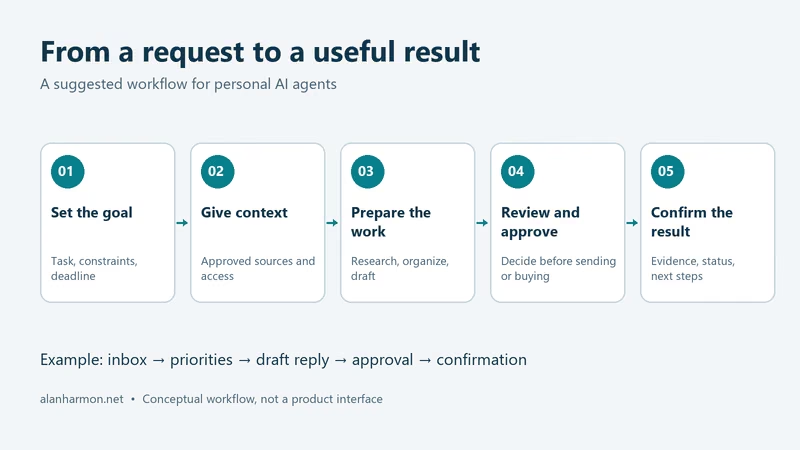
Across these examples, I keep coming back to the same pattern: give the agent a goal, provide the right context, let it prepare the work, make the necessary decision, and get a record of the outcome.
For email, that might mean an important message becomes a draft reply and a proposed calendar entry. For research, it might mean source material becomes a comparison with links. The benefit grows when those steps stay connected.
I would still start with a bounded task and limited access. A dependable briefing or accurate report would earn more of my confidence than a large promise. I also want an agent to say clearly when it is blocked or uncertain.
From a request to a useful result
Why I am excited to see where this goes
My enthusiasm is about the time and attention this could give back. There are useful tasks that remain unfinished simply because they require a dozen small steps across several places.
Muse makes that possibility feel more immediate. The adoption is worth watching, but the lasting test will be whether people keep returning because the work is getting done reliably.
If I were choosing a first experiment, I would pick one recurring chore, define what a good result looks like, and compare the output with how I normally do it. That is enough to learn something useful—and it may reveal the next task worth delegating.
Research and writing assisted by AI. Hero image is an AI-generated illustration, not a Muse screenshot. The workflow diagram is an original illustration of a suggested process. Product details and source links were reviewed October 22, 2026; features depend on available connections and permissions.