



Codex Has Become Surprisingly Useful—and It’s Happening Fast

My experience of Codex’s rapid improvement, a verified product timeline, and practical workflows for football data, email review and storage, spreadsheets, documents, reusable tools, and automation.
There was a point when my experience with Codex felt like a promising idea that required a lot of supervision. It could suggest an impressive approach, explain a problem, or produce code that looked useful. Getting from that first answer to something I could actually use was another matter.
When I say it was “barely working,” I mean repeated corrections, incomplete tasks, and substantial hands-on guidance in my own projects. I would explain what I wanted, inspect the result, point out what had been missed, and work through another round. Sometimes I felt as though I was managing every step of the work I had hoped to hand off.
That experience has changed enough that I want to write about it. Codex has become surprisingly useful, and the change seems to be happening quickly. By September 2026, I am thinking about it less as a place to ask a programming question and more as a way to get a sequence of work completed.
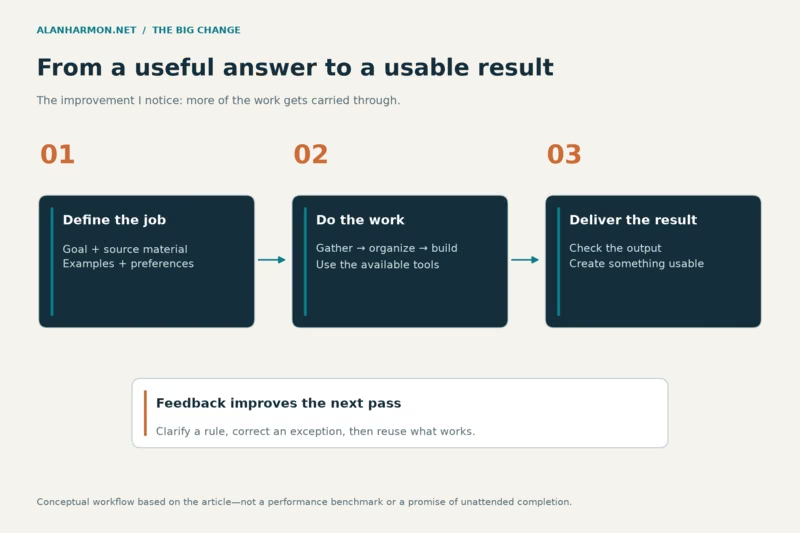
The important word is sequence. Find the information. Understand it. Organize it. Create the files. Check the result. Deliver something usable. Each piece existed in some form before; what matters to me is how much better the pieces now work together.
From instructions to finished work
A short timeline of a fast change
A few milestones help explain how we got here. These dates describe product developments, rather than the exact dates my own experience improved:
- May 2025: Cloud coding tasks, code changes, and GitHub pull-request workflows were already central to Codex.
- February 2, 2026: The Codex desktop app launched on macOS, bringing projects, parallel agent threads, skills, and automations into one interface.
- June 25, 2026: Codex Remote reached general availability, letting a phone start or continue work on a connected Mac or Windows computer.
- July 9, 2026: Codex joined the ChatGPT desktop app. July also brought further browser, voice, and computer-use improvements.
- September 2026: For me, the significance is practical: football data, email review, reports, documents, and ongoing website work.
The dated product milestones come from the official ChatGPT and Codex changelog. My assessment of usefulness comes from my own projects. Those are related, but they are different kinds of evidence.
The biggest improvement is finishing the whole job
A good explanation is valuable. But if I ask how to turn a data file into a useful webpage, an explanation still leaves most of the work on my desk. I have to obtain the file, identify its fields, decide how to store it, create the page, and discover what breaks.
The newer experience can carry that work through several stages. Codex can inspect the material it has access to, write a small script, process the data, create an output, run checks, and revise the result. It can also explain what remains uncertain rather than treating the first plausible answer as the finish line.
I still need to define the result I want. “Make this useful” leaves too much open. “Import these files, preserve the existing records, build a page I can search, and show me how you checked it” gives the work a destination. The improvement becomes much easier to see when the destination is a working result.
My NFL example: public data becomes a working website
My NFL work is a good example. The starting point is downloading files from nflverse, a community of tools and data resources for football analysis. The files are useful raw material. They are not, by themselves, the pages I want visitors to use.
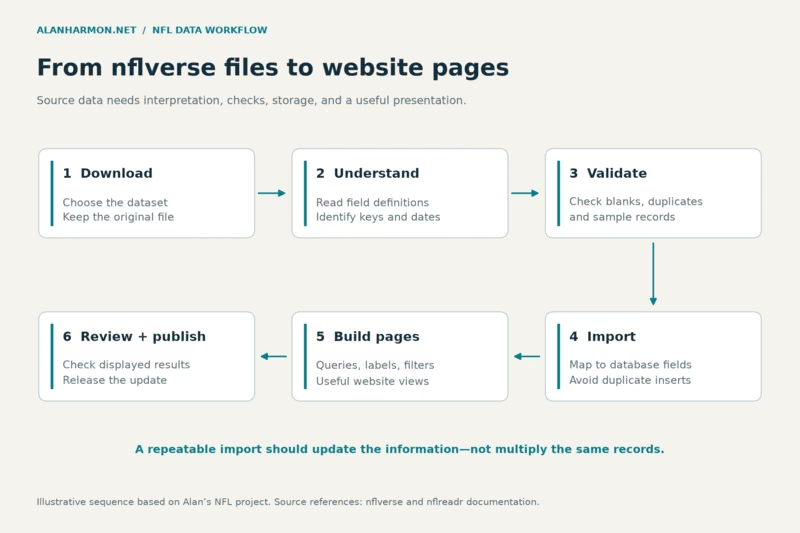
The sequence runs from understanding the file structure to importing the information into my database and building website pages that display it. Codex can help with that entire path instead of leaving me with unrelated fragments of code.
Understanding the data is essential. What does one row represent? Which identifier connects a player, team, or game to another table? Is a blank field genuinely missing? Are two files covering the same season and type of game? The nflreadr documentation provides download tools and links to data dictionaries that help answer those questions.
A sensible import also checks duplicates, record counts, and sample results. Downloading the file twice should not silently double the database. Then the webpage needs its own check: do its labels and filters match what the underlying data actually means?
That is why this example feels different from asking for a football answer. The result is a website feature I can continue using. The diagram shows the workflow and the checks that make it repeatable; it is not a claim that every source updates instantly or that every stage runs unattended.
NFL files to a working website
The same pattern works far beyond football
Replace NFL files with inventory exports, sales reports, membership lists, or a business dashboard, and the basic job looks familiar. Information arrives in one format, needs interpretation and cleanup, and should end up somewhere people can use it.
An inventory example might combine supplier files, match product identifiers, and flag items needing attention. A membership example might standardize names while preserving separate people who happen to share a surname. A sales report might reconcile detail rows with a stated total before presenting a weekly summary.
These are possible applications of the same approach, not projects I am claiming to have completed in every business. What interests me is how many everyday chores have this structure. They are too specific for a generic report and too repetitive to be enjoyable manual work.
Gmail Review surprised me most
I expected a coding tool to help with code. I was more surprised by how useful email review could be. Reviewing messages, identifying important items, summarizing a long thread, and deciding what deserves attention are real work, even though they do not look like software development.
The value is not simply a shorter version of every message. I want a useful distinction between something that needs a decision, something I should know, something I might enjoy later, and something that can get out of the way.
That makes email review personal. A sender I consistently care about should be treated differently from a newsletter I occasionally read. A promotion can be worth keeping if it concerns something I actually use. “Promotional” and “worthless” are not the same category.
Here is the kind of review guidance I want the system to follow:
- Preferred senders: give their messages early attention.
- Approved senders: review normally, without assuming every message is urgent.
- Occasional interests: keep useful items available for a later digest.
- Promotions worth keeping: retain relevant offers and their expiration dates.
- Complete junk: separate it according to explicit cleanup rules.
Those preferences give the review a purpose. A familiar sender can still send something unimportant, and an unfamiliar sender can send something that matters. The message, thread, deadline, and my rules all belong in the decision.
From reviewing email to storing useful information
Once an important message has been identified, the work can continue. A connected email tool can help retrieve the thread or an available attachment. Codex can extract a deadline, assemble an action list, compare the attachment with another document, or prepare a reply for my approval. What is possible depends on the connected tool and its permissions; email access is not automatic access to every account.
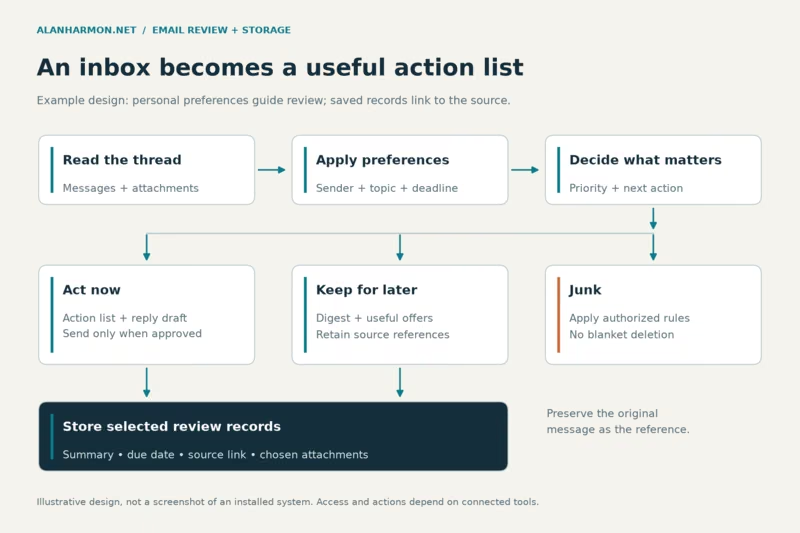
For storage, the useful model is a review record that points back to the original message. It might contain the sender, subject, message date, a short summary, the reason it matters, a due date if one is stated, and a link to the source. An attachment can be saved in a designated folder when that is part of the requested workflow.
The diagram below is an example of the review-and-storage process I want, rather than a claim that a particular storage system is already installed. Keeping the source link matters: a summary should help me return to the evidence, not become an unexplained substitute for it.
I also want the boundaries to be clear. Preparing a reply is one step; sending it is another. Labeling, archiving, or deleting messages should follow the rules I have authorized. OpenAI's plugin documentation describes how connected tools extend access to services such as Gmail, Drive, and Slack.
Email review and useful storage
“Using the computer” can mean different things
It is easy to group everything under the idea that AI can now operate a computer. In practice, the route matters:
- Connected-app access: a tool retrieves data or performs supported actions in a service. Email review may use this route without clicking through an inbox.
- A browser: an agent can read pages, click, and type. The desktop app's built-in or connected browser is distinct from ChatGPT Work's browser on a separate cloud computer.
- Local desktop control: supported Computer Use workflows can operate graphical applications on the user's machine, subject to the environment and granted access.
A cloud browser is not quietly controlling the laptop on my desk. Likewise, having a Gmail connection does not mean the agent can manipulate every desktop application. The official browser guide and Computer Use guide explain these distinctions.
Availability varies with the operating system, region, product surface, installed tools, and permissions. For me, the practical question is which route can complete the particular job. A structured connection is often the most direct way to read records; visual interaction is useful when the work really depends on the interface.
Messy spreadsheets can become readable reports
My payroll contribution sheet is the kind of material that makes this capability interesting to me. A report is only useful if the underlying rows, names, and totals make sense. A polished heading cannot fix an unexplained difference in the numbers.
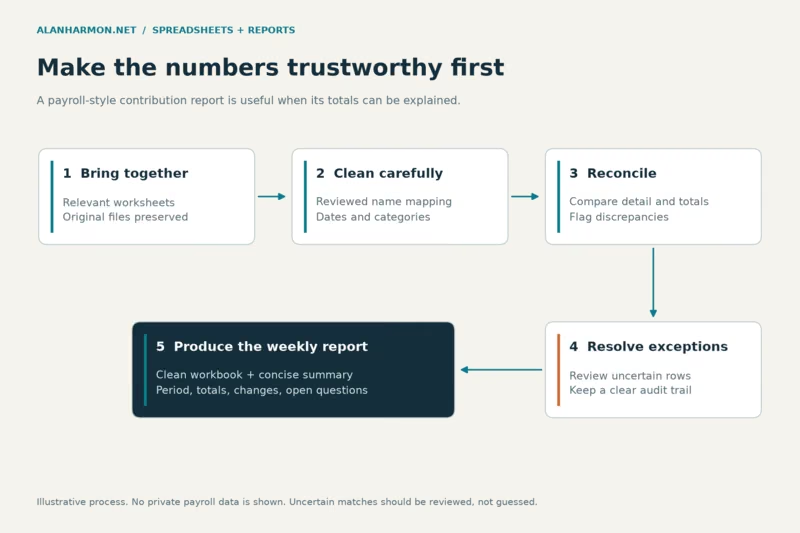
A useful workflow would consolidate the relevant worksheets, standardize inconsistent names using a reviewed mapping, check for duplicate entries, reconcile the totals, and produce a concise weekly report. It should preserve the original inputs and make exceptions visible instead of quietly guessing which employee or category a row belongs to.
The output might be a clean workbook plus a short explanation: what period it covers, which totals were checked, what changed, and which discrepancies need my attention. That is much more useful than a large spreadsheet with prettier colors.
Codex can work through files and scripts; using it does not necessarily mean it is clicking in an open copy of Excel. The available tools determine how the work gets done. OpenAI's file workflow documentation covers creating and reviewing spreadsheet and document outputs across its supported surfaces.
From worksheets to a weekly report
PDFs, scans, and information scattered across services
Documents bring a related set of possibilities: extract information from a PDF, compare versions, turn a table into a spreadsheet, or create something readable and printable. Scanned documents add another step because the text may need to be recognized from an image.
I would want uncertain characters and numbers flagged, particularly when a scan is faint or a table is crowded. A readable output should still be checked against the original. The purpose is to reduce the work of extracting and organizing information, not to make a questionable transcription look authoritative.
Connected services extend the same idea. A document might live in Drive, the explanation in an email, and a later decision in a discussion. When the appropriate services are connected, Codex can help locate relevant material and bring the pieces together. It can only search what the connection exposes and what the account is allowed to access.
That makes source references especially useful. I want to know which document supplied the number, which message changed the deadline, and whether two sources disagree. Finding information and explaining where it came from belong together.
Small tools finally become worth trying
There are many small tools I can imagine wanting without wanting to turn them into a major software project: a custom calculator, a searchable directory, a tracker for a particular process, or a simple website built around one person's needs.
Codex changes the effort involved in trying an idea. I can describe the inputs, the result, and an example of what should happen, then work toward a small usable version. The useful first version may be only one page or one form.
The same applies to maintaining what already exists. In my PHP and VB.NET projects, the work can include explaining unfamiliar code, tracing an error, reviewing a proposed change, and making an incremental improvement. A targeted fix that fits the existing application can be more valuable than an ambitious rewrite.
I still care about the same evidence: what changed, whether the relevant checks passed, and whether the result fits the intended use. Faster development makes those questions easier to investigate; it does not make them disappear.
Teach the process once, then reuse it
A useful report becomes more valuable when I can reproduce it with next week's inputs. That is where reusable skills and templates come in. A skill can package instructions and supporting resources for a specific workflow; a template can preserve the desired structure and presentation. OpenAI's skills guide describes that approach.
For a recurring report, I want the instructions to explain which files to use, how to recognize a complete input, which totals to reconcile, what to do with exceptions, and where the finished result belongs. The example output shows what “done” looks like.
Scheduling is a separate step. A recurring research briefing, reminder, or periodic check becomes an automation only after the task and schedule are configured. A conversation about doing something every Friday is not evidence that it will run every Friday.
Scheduled tasks can reuse tools and skills available to their environment. Local work needs the computer on and the app running; a cloud task cannot assume access to a folder on my PC. I would test the task manually, then review its early scheduled results. The goal is fewer recurring chores, with a clear place to find the outcome.
One project can produce several useful results
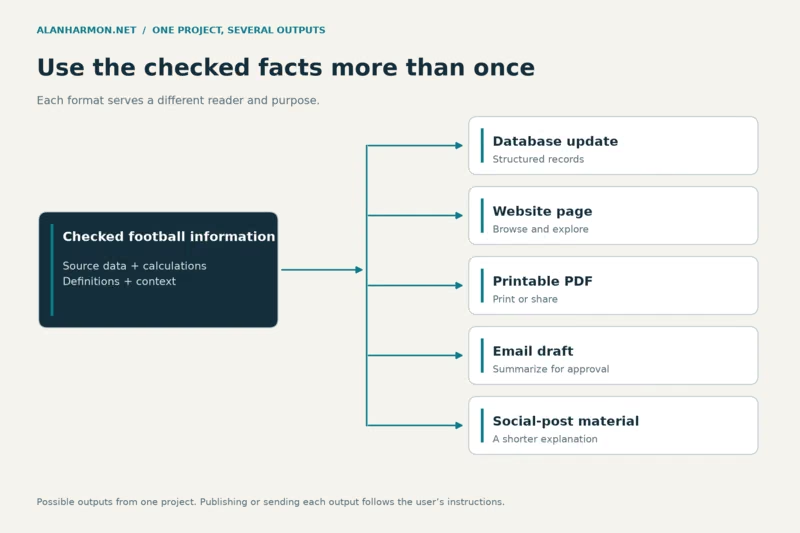
A football report need not end with one webpage. Once the underlying information has been checked, the same project could produce a database update, the website view, a printable PDF, an email draft, and material for a social post.
Those outputs serve different purposes. The website supports browsing. The PDF is convenient to print or share. An email draft can highlight the main points. Social material needs a shorter explanation. They should share the same checked facts without pretending the same layout works everywhere.
This is another example of an achievable workflow, rather than a claim that I have already automated every output. It is appealing because the difficult work of understanding the source does not have to be repeated independently for each format.
One project, multiple useful outputs
Why I am paying attention now
My early experience taught me to be cautious about a convincing first answer. My more recent experience is teaching me to ask for a complete result and to give Codex enough context to reach it.
There are still corrections to make and limits to work around. But the range of useful work has expanded: data becomes pages, messages become action lists, spreadsheets become reports, and small ideas become tools I can try.
That is the change I notice most. More of the work can move from “I should get around to that” to something I can actually use. For a personal website, a football project, or the routine information work around a business, that is a substantial difference—and it has arrived faster than I expected.