



A Complete Guide to Markdown Files: Syntax, History, YAML, and the AI Agent Era.

A comprehensive guide to Markdown files covering the origins of Markdown, basic and advanced syntax, CommonMark and GitHub Flavored Markdown, YAML front matter, related formats such as TOML and MDX, and the rapidly growing use of Markdown files as persistent instructions and context for AI agents.
What Is a Markdown File?
A Markdown file is a plain-text document containing text along with simple punctuation-based formatting instructions. The most common filename extension is .md, although .markdown is also used.
A file named:
README.mdis fundamentally still a text file. The .md extension tells compatible software that the contents should be interpreted as Markdown.
For example:
# My Heading

This is a paragraph containing **bold text**.

- First item
- Second item
- Third item
A Markdown renderer can convert that into headings, paragraphs, bold text, and a formatted list.
Without a Markdown renderer, however, the original document remains understandable. That was one of Markdown's central design ideas: the source itself should be readable.
Markdown Is Not a Word-Processing File Format
A Microsoft Word document stores substantially more than the visible words. It can contain detailed typography, layout, styles, embedded objects, document properties, and many other features.
Markdown takes almost the opposite approach. The file stores primarily text and lightweight structural hints.
That creates several important advantages:
- Markdown files are small.
- They can be opened with almost any text editor.
- They work especially well with version-control systems such as Git.
- Changes between versions can be compared line by line.
- They are easy for software to parse.
- They are easy for people to create.
- They can survive changes in editors, operating systems, and software platforms.
Markdown does not eliminate more complex document formats. Instead, it occupies a useful middle ground between completely unstructured text and heavily structured formats such as HTML, XML, JSON, or word-processing documents.
The History of Markdown
2004: John Gruber Creates Markdown
John Gruber introduced Markdown in 2004. Aaron Swartz provided important feedback on the design of its formatting syntax.
The original project had two closely connected parts: the Markdown syntax itself and Markdown.pl, a Perl program that converted Markdown into HTML.
The objective was not to replace HTML completely. The objective was to make the process of writing web content much more pleasant.
Compare these two examples.
HTML
<h2>My Favorite Tools</h2>

<p>These are the tools I use:</p>

<ul>
    <li>Visual Studio Code</li>
    <li>Git</li>
    <li>Markdown</li>
</ul>
Markdown
## My Favorite Tools

These are the tools I use:

- Visual Studio Code
- Git
- Markdown
The Markdown version is dramatically easier to type, but more importantly, it still looks like a structured document when viewed as ordinary text.
The Proliferation of Markdown Implementations
Markdown became popular, but the original description intentionally left some behavior loosely defined. As different developers built Markdown processors, edge cases could be interpreted differently.
Over time this produced multiple Markdown dialects and implementations.
CommonMark Brings More Precise Rules
CommonMark was created to provide a much more precise specification of Markdown behavior. Rather than relying on informal interpretation, CommonMark defines detailed parsing rules and provides examples that can also serve as conformance tests.
This matters when the same Markdown document needs to render consistently in different software.
GitHub Flavored Markdown
GitHub helped make Markdown familiar to millions of developers through README files, issues, pull requests, documentation, and other repository content.
GitHub Flavored Markdown, commonly abbreviated GFM, is based on CommonMark while adding commonly desired features. These include features such as tables, strikethrough, task-list items, and extended automatic linking behavior.
Markdown had now become far more than a blogging syntax. It had become a standard part of software development culture.
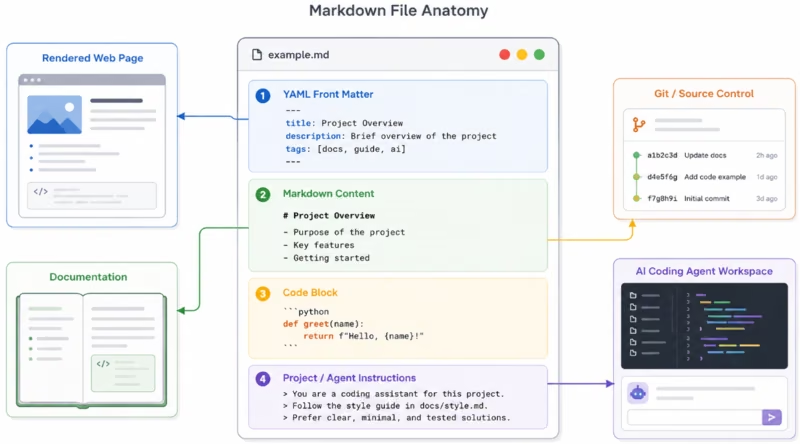
Essential Markdown Syntax
One of Markdown's strengths is that most people can learn the essential syntax in a few minutes.
Headings
# Heading 1
## Heading 2
### Heading 3
#### Heading 4
The number of hash characters indicates the heading level.
Bold Text
**This text is bold**Italic Text
*This text is italic*Bold and Italic
***This text is bold and italic***Bulleted Lists
- Apples
- Oranges
- Bananas
Numbered Lists
1. First step
2. Second step
3. Third step
Links
[AlanHarmon.net](https://alanharmon.net)Images
The text between the square brackets is the image's alternative text.
Blockquotes
> This is a blockquote.Inline Code
Use the `AGENTS.md` file.Code Blocks
Triple backticks can create fenced code blocks:
```php
echo "Hello World";
```
The optional word following the opening backticks identifies the programming language. A compatible renderer can use that information for syntax highlighting.
Horizontal Rules
---Escaping Markdown Characters
A backslash can be used when a punctuation character should appear literally instead of being interpreted as Markdown.
\*This should not be italic\*Paragraphs and Line Breaks
A blank line normally separates paragraphs. Simply pressing Enter once does not necessarily create the same visual break that a word processor would create.
This is one of the small behaviors that new Markdown users often need to learn.
Markdown Is Not One Completely Uniform Language
This is one of the most important technical details to understand about Markdown.
There is not one universal Markdown renderer that controls every Markdown document everywhere. Different applications can support different syntax extensions and can make different decisions about rendering.
Three names appear frequently:
Original Markdown
This refers to the syntax and behavior associated with John Gruber's original Markdown project.
CommonMark
CommonMark attempts to define Markdown much more rigorously so separate implementations can produce consistent results.
GitHub Flavored Markdown
GitHub Flavored Markdown builds on CommonMark and adds extensions useful for software-development collaboration.
For example, a table written like this:
| Product | Status |
|---------|--------|
| Alpha   | Ready  |
| Beta    | Testing |
can render as a formatted table in GitHub Flavored Markdown.
Task lists are another familiar extension:
- [x] Create database
- [x] Build editor
- [ ] Publish website
Do not assume that every Markdown processor supports every feature you have seen somewhere else.
| Feature | Common Markdown | CommonMark | GitHub Flavored Markdown |
|---|---|---|---|
| Headings | Yes | Yes | Yes |
| Bold / Italic | Yes | Yes | Yes |
| Links | Yes | Yes | Yes |
| Fenced code blocks | Commonly supported | Yes | Yes |
| Tables | Renderer dependent | Not part of core CommonMark | Yes |
| Task lists | Renderer dependent | Not part of core CommonMark | Yes |
| Strikethrough | Renderer dependent | Not part of core CommonMark | Yes |
The practical lesson is simple: when Markdown will be processed automatically, know which Markdown parser or flavor the destination system expects.
What Happens When a Markdown File Is Rendered?
A Markdown file and its rendered output are two different things.
The source might contain:
## My Heading

This is **important**.
A Markdown processor recognizes the structure and can generate HTML conceptually similar to:
<h2>My Heading</h2>

<p>This is <strong>important</strong>.</p>
The HTML can then be styled with CSS like any other web content.
This separation is powerful because the Markdown document describes the structure of the content without having to describe its complete visual appearance.
Markdown and HTML Can Sometimes Be Mixed
Many Markdown implementations support at least some raw HTML inside Markdown documents. Exactly how it is treated depends on the parser and the application.
This flexibility is useful, but it also means applications that accept Markdown from untrusted users need to consider how the resulting HTML is handled and sanitized.
A Markdown Parser Is Software
The .md file itself does not magically format anything. An application reads the text, parses the syntax, creates an internal representation of the document, and then renders it into HTML or another output format.
That distinction explains why the same Markdown file can sometimes look slightly different in different applications.
Markdown and YAML: Why They Are Often Found Together
YAML is one of the most useful companion topics to understand when learning modern Markdown.
YAML is not Markdown.
YAML is a data-serialization language designed to represent structured information in a human-readable text format. It is widely used for configuration files and structured metadata.
Markdown and YAML frequently appear together through a convention known as front matter.
What Is Front Matter?
Front matter places structured metadata at the beginning of a content file, followed by the actual content.
A typical Markdown blog file might look like this:
---
title: "My First Blog Post"
slug: "my-first-blog-post"
author: "Alan Harmon"
date: 2026-08-12
status: published
tags:
  - markdown
  - websites
  - ai
---

# My First Blog Post

This is the actual Markdown content.
The section between the triple-dash delimiters contains YAML data. Everything following it can be Markdown.
A content-management system or static-site generator can read the YAML to determine information such as:
- Title
- Author
- Publication date
- Slug
- Categories
- Tags
- Template or layout
- Publication status
- Featured image
The Markdown section contains the content intended for the reader.
Front Matter Is a Convention, Not Core Markdown Syntax
This distinction matters.
Triple-dash YAML front matter is widely used by tools such as static-site generators, but it is not part of the core Markdown specification. The application processing the document decides whether front matter has special meaning.
Other Technologies Commonly Associated with Markdown
Markdown often sits in the middle of a larger text-based ecosystem. Understanding a few neighboring technologies helps explain why Markdown is so useful.
YAML
YAML is designed for structured data. It is often used for configuration and front matter.
Think of the relationship this way:
- Markdown: primarily describes human-readable document content.
- YAML: primarily describes structured data.
JSON
JSON is another structured-data format. It is generally more rigid than Markdown and is especially common when software systems exchange data.
{
    "title": "My Article",
    "status": "published"
}
JSON is excellent for machines, APIs, and predictable data structures. Markdown is usually more pleasant for long-form human writing.
TOML
TOML is a configuration format designed to be easy for humans to read while mapping predictably into structured data.
title = "My Article"
status = "published"
Some software ecosystems use TOML where other systems might use YAML.
HTML
HTML describes the structure of web documents directly.
Markdown frequently serves as a simpler authoring format that is later converted into HTML.
MDX
MDX combines Markdown with JSX. It allows a content author to place components within Markdown-oriented content, making it useful for interactive documentation and component-driven web applications.
Mermaid and Other Embedded Languages
Some Markdown platforms recognize special fenced code blocks and transform them into diagrams or other rich content.
For example, GitHub can render Mermaid diagram definitions placed inside supported Markdown content.
This is another example of an important principle: Markdown provides the basic document structure, while the application rendering Markdown can extend that structure with additional capabilities.
One useful way to think about Markdown's history is that it has had three major lives.
- Markdown for publishing: an easier way to write content that could become HTML.
- Markdown for software documentation: README files, project documentation, issues, specifications, and developer knowledge.
- Markdown for AI agents: durable instructions, plans, rules, prompts, and project context that can be read by both people and AI systems.
The third category is not a new version of Markdown. It is a new use for the same qualities that made Markdown successful in the first place.
The Recent Rise of Markdown Files for AI Agents
One of the most interesting developments in Markdown's history has occurred with the rapid growth of AI coding assistants and autonomous agents.
Large language models do not require Markdown in order to understand instructions. Plain text works perfectly well.
Markdown is nevertheless extremely convenient for agent instructions because it combines several valuable characteristics:
- It is plain text.
- It is naturally readable by humans.
- It provides clear hierarchy through headings.
- Rules can be expressed as lists.
- Commands and code can be placed in fenced blocks.
- Files work naturally with Git repositories.
- Changes to instructions are easy to review.
- The same instructions can be read by developers and AI tools.
As AI agents became capable of working across complete software repositories instead of merely generating individual code snippets, they needed persistent project-level context.
Markdown files became a natural solution.
AGENTS.md and OpenAI Codex
OpenAI Codex supports AGENTS.md files containing project instructions. These files can describe repository conventions, build commands, testing expectations, development practices, and other information that Codex should consider while working.
An example might look like this:
# AGENTS.md

## Project Overview

This project is a PHP website using SQLite and W3.CSS.

## Development Rules

- Preserve existing URL structures.
- Do not add JavaScript unless required.
- Keep database access in the existing data layer.
- Use prepared statements for database queries.

## Testing

Before completing a change:

1. Check PHP syntax.
2. Test affected URLs.
3. Verify database changes.
4. Review error logs.

## Documentation

Update the appropriate Markdown documentation when
a change affects the project architecture.
Notice what is happening here. This is not source code and it is not traditional configuration data. It is natural-language operational documentation that software can deliberately load into an agent's context.
CLAUDE.md and Claude Code
Anthropic's Claude Code similarly supports CLAUDE.md files for persistent project context and instructions.
GitHub Copilot Instructions
GitHub supports repository-level instructions in a Markdown file such as:
.github/copilot-instructions.mdGitHub's current documentation also describes support for agent-instruction conventions including AGENTS.md, CLAUDE.md, and GEMINI.md in supported Copilot agent environments.
Markdown Is Becoming an Interface Between Humans and Agents
This development may turn out to be one of Markdown's most consequential uses.
Software projects have always needed documentation. AI agents make current, machine-accessible documentation even more valuable because an agent can actively consult those instructions while performing work.
The Markdown file is no longer merely something a developer might read someday. It can become part of the working context used to make decisions about a project.
A Practical Markdown File for an AI-Assisted Project
A well-designed project does not necessarily need one enormous instruction file. Markdown makes it easy to divide information by purpose.
For example:
project/
│
├── AGENTS.md
├── README.md
│
├── docs/
│   ├── architecture.md
│   ├── database.md
│   ├── coding-standards.md
│   ├── deployment.md
│   └── current-work.md
│
└── src/
The top-level agent file can contain the rules that should almost always be considered while pointing to more detailed documentation when needed.
This avoids turning a single file into an unmanageable wall of instructions.
Good Agent Documentation Is Still Good Human Documentation
There is an important lesson here.
Documentation should not be written as incomprehensible machine prompts merely because an AI agent will consume it.
The best Markdown instructions are usually explicit, organized, concise, and understandable by a human developer.
For example, this:
## Database Changes

Before changing the database schema:

1. Review docs/database.md.
2. Preserve backward compatibility when practical.
3. Create a backup before migrations.
4. Update database documentation after changing the schema.
is useful to both a person and an AI agent.
The increased use of agents may therefore create an additional incentive to maintain better project documentation rather than making human documentation obsolete.
Why Markdown Works So Well with Git
Markdown's relationship with software development goes beyond GitHub's ability to render it.
Markdown files are plain text, which makes them naturally compatible with version control.
If someone changes:
- Use PHP 8.2.to:
- Use PHP 8.4.a version-control system can show the change directly.
That is far easier to inspect than comparing many binary document formats.
This makes Markdown particularly useful for:
- README files
- Project instructions
- Architecture documentation
- Change logs
- API documentation
- Installation instructions
- Technical notes
- Decision records
- AI agent rules
- Prompt libraries
A project can therefore version its documentation alongside its source code.
Markdown Features That Depend on Your Software
It is useful to distinguish Markdown itself from features that a particular Markdown application adds.
Depending on the renderer, you may encounter:
- Tables
- Task lists
- Footnotes
- Automatic link detection
- Mathematical notation
- Mermaid diagrams
- Emoji shortcodes
- Syntax-highlighted code
- YAML front matter
- Custom components
Some of these are standardized by a particular Markdown flavor. Others are application-specific extensions.
This explains a common situation: a Markdown document looks perfect in one editor but one feature does not work when the same file is opened somewhere else.
The safest approach for documents that must be highly portable is to use relatively conservative Markdown syntax unless you know which renderer will process the file.
Markdown Best Practices
1. Use Headings to Create a Real Hierarchy
Do not simply make everything bold. Use #, ##, and ### headings to represent the actual structure of the document.
2. Keep the Source Readable
If Markdown becomes so complicated that the raw document is difficult to understand, some of Markdown's main advantage has been lost.
3. Use Blank Lines Generously
Clear spacing improves both Markdown parsing and human readability.
4. Use Fenced Code Blocks for Multi-Line Code
When possible, identify the programming language after the opening fence so compatible renderers can provide syntax highlighting.
5. Write Meaningful Link Text
Prefer descriptive link text instead of vague phrases such as "click here."
6. Write Useful Image Alt Text
Image syntax supports alternate text. Describe what the image communicates rather than simply repeating a filename.
7. Know Your Renderer
Before relying on tables, task lists, diagrams, front matter, or other extensions, determine whether the destination application supports them.
8. Keep Agent Instructions Explicit
When Markdown is being used for AI instructions, clear statements generally work better than implied expectations.
Instead of:
Be careful with the database.write something actionable:
Before modifying the production database:

1. Create a backup.
2. Verify the migration against the development database.
3. Do not delete existing columns without explicit approval.
9. Separate Stable Rules from Temporary Notes
Long-term architecture standards and coding conventions should not be mixed indiscriminately with temporary task notes.
10. Keep Documentation Current
Outdated documentation can be worse than missing documentation, particularly when an automated agent is instructed to rely on it.
When Should You Use Markdown?
Markdown is an excellent choice when the information is primarily textual and needs to remain portable, editable, and understandable.
Typical uses include:
- Documentation
- Blog source files
- README files
- Knowledge bases
- Technical instructions
- Project notes
- Meeting notes
- Change logs
- AI prompts
- AI agent instructions
- Planning documents
- Static websites
When Is Markdown Not the Best Format?
Markdown is not intended to solve every document problem.
A different format may be preferable when you require:
- Precise page layout
- Complex desktop-publishing typography
- Highly structured machine data
- Complex spreadsheets
- Advanced interactive user interfaces
- A strict schema with extensive data validation
For example, JSON, YAML, a database, HTML, PDF, DOCX, or a spreadsheet may be better suited to those tasks.
The important question is not whether Markdown can technically represent something. It is whether Markdown remains the simplest appropriate format for the job.
Frequently Asked Questions About Markdown Files
What does .md mean?
.md is the most commonly encountered filename extension for a Markdown document. A file named README.md, for example, normally contains Markdown-formatted plain text.
Do I need special software to open a Markdown file?
No. Because Markdown files contain plain text, they can be opened in ordinary text editors. A Markdown-aware editor or viewer adds conveniences such as syntax highlighting and rendered previews.
Is Markdown a programming language?
No. Markdown is a text-formatting syntax used to describe document structure. It does not function as a general-purpose programming language.
Is Markdown the same as HTML?
No. Markdown is much simpler. Markdown processors frequently convert Markdown into HTML, which is one reason Markdown became popular for writing web content.
Is YAML part of Markdown?
No. YAML and Markdown are different formats. Some publishing systems place YAML front matter at the beginning of Markdown files to provide structured metadata.
What is GitHub Flavored Markdown?
GitHub Flavored Markdown is a CommonMark-based Markdown specification with extensions useful on GitHub, including features such as tables, task-list items, strikethrough, and extended autolinking.
What is CommonMark?
CommonMark is an effort to specify Markdown syntax precisely enough that independent parsers can handle the same documents consistently.
Why do AI coding agents use Markdown files?
Markdown is convenient for AI-agent instructions because it is structured enough to organize rules and examples while remaining ordinary human-readable text that can live directly inside a source-code repository.
Does an AI model require Markdown?
No. Large language models can understand ordinary text. Markdown is useful because it gives that text predictable organization and works naturally with existing development and documentation workflows.
What is AGENTS.md?
AGENTS.md is a Markdown filename used by agentic development tools including OpenAI Codex to provide repository or directory guidance to an AI agent.
What is CLAUDE.md?
CLAUDE.md is a Markdown-based project instruction mechanism used by Claude Code to provide persistent project context.
Can Markdown contain diagrams?
Core Markdown does not define a general diagram language, but some platforms support diagram definitions inside fenced blocks. GitHub, for example, supports Mermaid diagrams in appropriate Markdown content.
Will every Markdown file render the same everywhere?
Not necessarily. Markdown implementations and extensions can differ. Documents using basic syntax are generally more portable than documents that rely heavily on application-specific features.
The Future of Markdown
Markdown is more than 20 years old, yet its importance may actually be increasing.
That is unusual in computing, where file formats and development tools frequently disappear as quickly as they arrive.
Markdown has endured largely because it does not attempt to do too much.
A Markdown document can be read by a person with no specialized software. It can be processed by a website. It can live inside a Git repository. It can be converted into other document formats. It can contain code examples. It can be paired with structured metadata. And now it can provide instructions and context to AI systems that perform work within a project.
The rise of AI agents does not change what Markdown is.
Instead, it demonstrates how valuable a simple, open, human-readable text convention can become when both people and software need to understand the same information.
Markdown began as a better way to write for the web.
Today it has become one of the common languages through which humans document ideas, software describes projects, and AI agents learn how we want them to work.
For a file format built mostly from ordinary text and a handful of punctuation characters, that is a remarkable amount of responsibility.